IT system integrations increasingly determine whether a company operates efficiently or loses time transferring data manually between different tools.
For many businesses, IT system integrations are not just a technical improvement. They are a practical way to reduce repetitive work, improve data consistency and make daily operations easier to control.
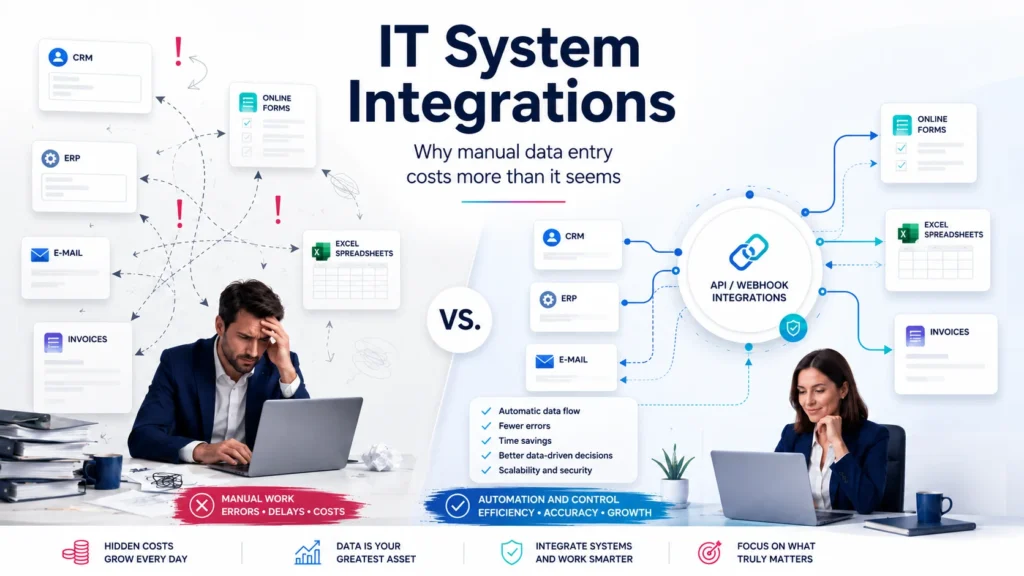
In many companies, daily work still follows a simple pattern: data appears in one place, and then someone has to copy it into another system. A contact form arrives by e-mail, and the data is then manually entered into a CRM. An order from one system has to be recreated in an invoicing application. A payment status must be checked separately, and then the customer has to be marked as handled. A report is created by exporting several files and manually combining them in a spreadsheet.
At first glance, this seems harmless. After all, “it only takes a few minutes”. The problem begins when those few minutes are repeated every day, across many customers, documents and employees.
Manual data entry is rarely visible as a separate cost in a company. It does not appear on a supplier invoice. There is no single budget line called “losses caused by lack of integration”. Yet it still burdens the business — in terms of time, organization and data quality.
Manual Work Does Not Scale With the Company
In the early stages of a business, many processes can be handled manually. A few customers, a few invoices, a few requests per week — this does not necessarily have to be a problem. The owner or an employee is often able to keep most things under control.
The situation changes when the company grows.
More customers mean more forms, more messages, more orders, more invoices, more statuses to check and more data to move between systems. What used to take several minutes a day can start taking several hours a week. Later, it becomes a permanent part of operational work.
The biggest problem is that manual processes scale linearly. If the number of orders doubles, the number of manual tasks usually doubles as well. The company starts needing more people not because it is creating more value, but because it has to handle internal information chaos.
This is the point where IT system integrations stop being a “technical add-on” and become an element of cost control.
The Hidden Cost of Manual Data Entry
The cost of manual work is not limited to the time spent copying information itself. That is only the most visible part of the problem.
Manual data entry also generates indirect costs. An employee has to check whether the data is correct. They need to remember where to enter it. They need to know when a given action should be performed. Sometimes they have to go back to a previous message, compare data with an invoice, check a payment status or explain a discrepancy.
On top of that, there are interruptions. If a person responsible for customer service has to constantly switch between an e-mail inbox, CRM, invoicing system, spreadsheet and communicator, their work loses flow. Time is not only lost on the individual action itself, but also on constantly regaining context.
In practice, the company pays for something it does not directly see: micro-tasks, switching between tools, correcting mistakes, searching for information and manually supervising processes.
Errors Are Inevitable
Wherever data is entered manually, errors will appear sooner or later. This is not necessarily a matter of employee negligence. It is a normal result of human work in a repetitive, monotonous process.
Properly designed IT system integrations reduce the number of places where employees have to copy, rewrite or verify the same information manually.
A typo in an e-mail address, an incorrect tax identification number, a wrongly copied amount, a mistaken order status or an overlooked customer message may be enough. One small error can later cause several further problems: an incorrect invoice, a wrong shipment, delayed service, a complaint or loss of customer trust.
Companies often try to solve this problem by adding more checks. One person enters the data, another verifies it, a third approves it. This may reduce the number of errors, but it increases the cost of the process. The company still does not remove the source of the problem — it only adds another layer of manual work.
A well-designed integration reduces this problem at the source. Data is transferred automatically, according to defined rules, with validation and the ability to track exactly what happened.
Integration Is Not Just Connecting Two Systems
Well-designed IT system integrations are not only about connecting two applications. Their purpose is to organize the entire flow of information inside the company.
Integration is often understood too narrowly — as a technical connection between system A and system B. In practice, a good integration should answer a broader question: how should data flow through the business?
It is not only about sending a contact form to the CRM. You need to define which fields are required, what should happen with incomplete data, how duplicates should be handled, who receives a notification, when a task should be created for a salesperson, when the customer should enter an automated e-mail sequence and where the contact history should be stored.
The same applies to invoices, orders, payments, service requests, inventory levels and reports. Technology itself is only a tool. The key is to understand the business process and design the information flow in a way that reduces manual work, errors and ambiguity.
API, Webhooks, Automation and Queues — What Does This Mean in Practice?
A good starting point for understanding APIs is the REST architectural style, which is widely used in modern web systems and integrations.
Modern business systems increasingly allow automatic data exchange. This is usually done using APIs, webhooks, process automation and task queues.
An API can be treated as a structured way for systems to communicate with each other. One system can retrieve data from another system or send new information to it, for example customer details, an order, payment status or invoice number.
A webhook works slightly differently. It allows one system to automatically inform another tool that something has happened. For example: a customer filled in a form, a payment was recorded, an order changed status or a new support request appeared.
Process automation allows you to build business logic: when a specific event happens, the system performs the next steps without manual data entry. It can create a contact in the CRM, send a notification to a salesperson, prepare a task, save data in a report and mark the source of the inquiry.
Task queues are useful where there are many processes or where not everything should be executed immediately. They make it possible to safely handle larger numbers of events, retry failed operations and avoid situations where a single error stops the entire process.
For the company, the most important thing is not the technical terminology itself. The most important thing is the result: less manual work, fewer mistakes, better process control and more predictable operations.
Examples of Processes Worth Integrating
In practice, IT system integrations usually bring fast results wherever the company handles repetitive data every day: customer inquiries, orders, invoices, payments, support requests and reports.
With IT system integrations, reports can be based on current data instead of manually prepared exports from several disconnected tools.
One of the most common examples is sales lead handling. A customer fills in a form on the website, and the data automatically goes to the CRM. The system can assign a responsible person, send a notification, create a task and store the source of the contact. As a result, the company does not lose inquiries, and the person responsible for sales knows exactly what to do.
Another area is invoices and payments. If order data has to be manually copied into an accounting or invoicing system, mistakes are easy to make. An integration can automatically create the document, complete contractor data, send the invoice number back to the sales system and mark the order as settled.
Customer service is another important example. E-mails, contact forms, support tickets and customer communication should create one consistent history. Without integration, information is often scattered. One person has part of the data in their inbox, another in a spreadsheet, and another in the CRM. This causes delays and chaos.
Reporting is also worth attention. If reports are created by manually exporting data from several systems, the company loses time and risks working with outdated information. A well-designed integration can automatically collect data from different sources and prepare operational or management reports.
Lack of Integration Makes Company Management More Difficult
Manual data entry is not only a problem for operational employees. It is also a management problem.
If data is scattered, it is difficult to make good decisions. The company may not know how long customer service really takes, how many sales inquiries are lost along the way, how many invoices require correction, how long it takes to close a ticket or which customer acquisition source works best.
Without a consistent data flow, the company often manages itself based on fragments of information. Each department has its own version of reality. Sales sees one thing, accounting sees another, customer service sees a third, and the business owner receives a manually prepared report from time to time.
Integrations help reduce this problem. Data can flow automatically between systems, and decision-makers can see more quickly what is actually happening inside the company. That is why IT system integrations should be treated not only as a technical improvement, but also as a tool for better business management.
Automation Does Not Mean Losing Control
A common concern about automation is loss of control. A company may worry that “the system will do something by itself” and later it will be difficult to determine why it happened.
This concern is understandable, but it applies mainly to poorly designed automation.
A good integration should be transparent. It should include logs, error handling, notifications and the possibility of manual intervention. It is also important to define which actions may happen automatically and which should require human approval.
Not everything needs to be automated one hundred percent. Sometimes the best solution is a semi-automated model: the system prepares the data, checks correctness, fills in most fields, and a person approves the final decision.
The goal of integration is not to remove people from the process. The goal is to eliminate repetitive, low-value work and leave people with tasks where context, judgement and decision-making are required.
Where Should You Start With System Integration?
The worst approach is to start with the tool. Choosing an automation platform, CRM system or specific technical solution should be the result of process analysis, not the first step.
In practice, a good first step is IT consulting and audit: checking where data is currently being entered manually, which systems do not communicate with each other and which processes generate the most errors or delays.
First, it is worth answering a few practical questions:
Which data is entered manually most often?
Where do errors appear most frequently?
Which activities slow down customer service or sales?
Where do employees lose the most time switching between systems?
Which reports are created manually and needed regularly?
Which processes are critical for revenue, payments or customer service?
Only then should the integration be designed. Sometimes a simple automation between a form, CRM and e-mail is enough. In other cases, a more advanced solution is needed — with an API, task queue, intermediate database and error control.
The most important thing is that the integration solves a specific business problem, instead of being a technology implementation for its own sake.
When Does Integration Start to Pay Off?
Integration starts to pay off when the cost of manual work, errors and delays becomes higher than the cost of organizing the process.
A company does not always have to wait until it becomes large. In many cases, automating several repetitive activities brings results very quickly, especially when a given action happens every day and relates to customers, invoices, payments, support requests or sales.
It is worth looking not only at time savings. Integrations also improve data quality, shorten response time, reduce the number of mistakes and make management easier. The company becomes more predictable because fewer things depend on the memory of individual people.
Summary
Manual data entry often looks like a minor operational issue. In reality, it can be one of the silent costs of a company. It consumes time, increases the risk of errors, makes reporting harder and limits business scalability.
IT system integrations help organize the flow of information between tools the company already uses: CRM, ERP, e-mail, forms, invoicing systems, payments, spreadsheets, customer portals and reporting tools.
A well-designed integration is not about blindly automating everything. It is about understanding the process, eliminating repetitive work and maintaining control over data.
In practice, IT system integrations help a company regain control over processes that previously depended on manual work, employee memory and spreadsheets. This means less chaos, fewer errors and more time for activities that genuinely grow the business.